

Mobile
null (Originalregel)
The mobile board game world
The board game world has grown and developed over many years. A lot of technology has changed over the last 20 years. In addition to stationary computers, tablets and smartphones are the most frequently used devices.
To take this change into account, the m.BSW was brought to life. A completely browser-based way to use the BrettspielWelt.
Accessible at: https://m.brettspielwelt.de/
The interface
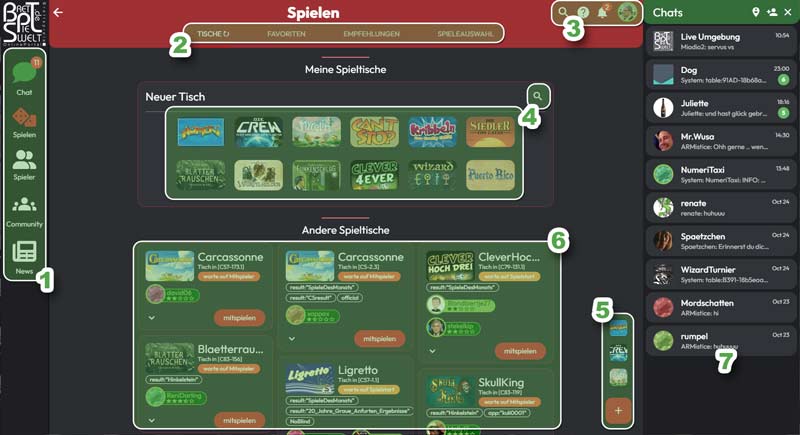
- Main menu selection: Chat On/Off, Play , Players, Community, News.
- Submenu corresponding to the current main selection.
- Search for game, player or group, context help, notifications and your own settings.
- Create your own new game table. Find a game that is not suggested.
- Quick game tablescreation of one of your most recently played games.
- game tables at the moment waiting publicly for other players.
- Chat area, similar function to the usual messenger.
This allows you to switch between the different areas of the board game world.
Chat < /h4>
Shows and hides the Chatarea. On mobile devices with small displays, the chat is placed over the rest of the application or hidden.
Play
The area for active play. Here you can see your gaming table and other gaming tables where players are being sought.
You can view a selection of games sorted by category or see game recommendations for you.< /span>
Under the favorites you will find your most recently played and most played games, as well as games that you favorite.
Players
Here you can find information about yourself and other players.
You can View your last teammates, find your friends quickly and admire your achievements.
You can also find your statistics for the various games you played here.
Community
The community area consists of a "stream" of groups that you have joined. It offers you a selection of groups that you can join or to which you have been invited.
In addition to the tournament area, you will also be able to find city information about the cities in the BrettspielWelt here.
Here you can write posts in groups you have joined and create new groups.
News
Here you will find news from the world of board games as well as current news from us.
In the "Dashboard "You have a good place to see who your friends are currently online and have a quick way to start one of your last games. You will also see your current group messages there.
Cerca
The search in the top navigation area can be a great help when using BrettspielWelt.
There you can quickly search for a game, find a teammate or friend, and at any time jump straight into a group. As you type in the search field, you will be shown various suggestions to save you unnecessary typing.
Each entry is marked with an icon that shows you what it is about. (Game, Player, Group)
Context help
Is closed If context help (3) is available on a page, you can click on it to get appropriate help for the corresponding page. We will always try to keep these up to date.
(I would be happy to help you create and maintain these aids, so feel free to write to me at alex@brettspielwelt.de )